Ragdoll Verity Sandbox Getting Started Guide
Your first solo session with Verity—warm up, launch, watch the ragdoll, repeat.
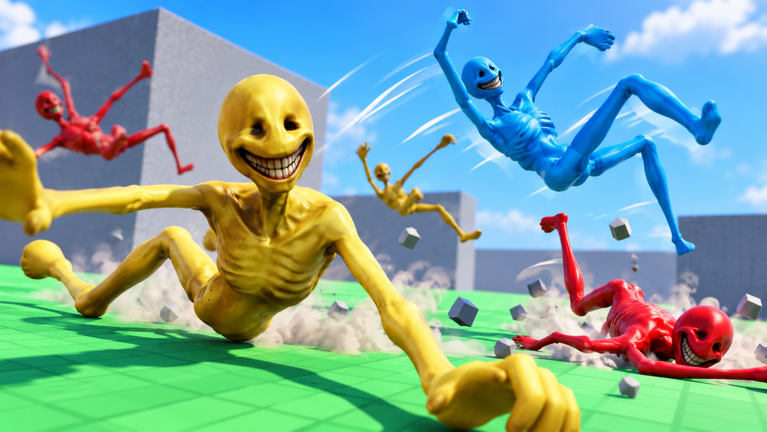
Ragdoll Verity Sandbox is a free Roblox solo physics sandbox by burg games... There is no lobby to fill, no party to assemble, and no campaign checklist yelling at you. You join alone (max players 1), interact with Verity, and spend the session pushing, throwing, and launching that character into obstacles so ragdoll physics can do something ridiculous. This guide walks a complete first session so you leave with skill—not just confusion.
Before you queue up, skim the wiki overview if you want the big-picture facts (release 28 October 2026, mild maturity, PC / mobile / tablet / console). Then join from the official Roblox place.
What success looks like in session one
Forget “reach level 10.” First-session success is:
- You understand push vs throw vs launch as your inputs feel on your device.
- You complete at least three intentional experiments (not pure button mash).
- You recover from one awkward soft-lock without rage-quitting forever.
- You save or mentally note one clip-worthy bounce.
- You know which wiki page to open next.
That bar is enough. Everything else is encore.
Minute 0–2: spawn and orient
When the world loads, do not yeet immediately. Spend two minutes on orientation:
- Rotate the camera a full circle. Note major landmarks and elevation changes.
- Confirm your movement keys or thumbstick respond.
- Find Verity and notice the default distance of the camera relative to the action.
- Decide whether you are playing for laughs, for film craft, or for map exploration—your pacing changes accordingly.
If controls feel alien, keep this tab open beside Controls. That page is honest about unconfirmed binds and platform differences.
Minute 2–8: flat-ground laboratory
Stay on relatively flat ground for the first experiments. Complexity comes later on the map obstacles page.
Experiment A — Soft push. Nudge Verity gently. Watch how limbs settle. You are learning the damping of the ragdoll, not farming damage numbers.
Experiment B — Firm throw. Commit to a harder throw in a clear direction with a visible landing zone. Compare tumble length to Experiment A.
Experiment C — Launch mindset. Use elevation if a small ledge is nearby; if not, simulate “launch” by combining a run-up feel with a committed throw. The goal is airborne time plus an interesting landing.
After each experiment, force yourself to narrate one sentence: “That bounce spun more because…” Talking out loud (even alone) builds pattern memory faster than silent mashing.
Mid-session video context
The embed on this page is a verified Roblox Ragdoll Verity Sandbox overview video. Watch a slice of it between Experiment B and your first obstacle run if you need a visual reference for pacing and chaos level. Then return to your own inputs—mirroring a video without understanding push weight teaches less than one mindful throw.
Minute 8–15: add one obstacle
Pick one obstacle or prop cluster. Only one. Ideas for how to choose live in Map & Obstacles, but for session one any safe-looking ramp, wall seam, gap, or prop pile works.
Protocol:
- Stand at a marked mental start (a painted line, a corner, a unique floor color).
- Perform the same throw twice.
- Change one variable on the third throw (angle, power, or release timing).
- Stop and compare.
This is the seed of the method expanded in Physics Tips. Sandbox players who skip the method drown in noise.
Resets, soft-locks, and patience
Solo sandboxes still soft-lock. Verity might wedge under geometry or leave the camera in a sad place. Recovery options, depending on what the place exposes:
- Character reset from the Roblox menu
- Rejoin the experience (fast because no party sync)
- Nudge camera first in case it is a view issue, not a physics issue
Do not install shady “unstuck” executors. Read why on the Scripts Hub if chat friends pressure you.
Codes, likes, and expectations
There are no verified promo codes as of November 2026. If you came from a “codes” search, skim the Codes Hub so you know how redemption would work later, then return to playing. Favorite and like the experience while you are there—those habits help burg games.. and are detailed on the community hub.
Minute 15–20: film one keeper
Even on mobile, capture one attempt:
- Face toward light so Verity reads as a silhouette against the sky or a bright wall if possible.
- Start recording before the push, not after the funny part already happened.
- End the clip after the ragdoll fully settles—late frames sell the joke.
If the take fails, you still practiced camera timing. That skill transfers to every later S-tier idea on the tier list.
What not to do in hour one
- Do not chase universal scripts for fly/noclip “just to see.”
- Do not assume multiplayer features exist—multiplayer is none.
- Do not judge the whole game by one wedged limb.
- Do not invent goals the description never promised (raids, rankings, trading).
After you quit to desktop
- Note your device and two setups that worked.
- Open Physics Tips while the muscle memory is fresh.
- Check Updates only if the Roblox Updated stamp looks newer than you remember (launch 28 Oct 2026; metadata bump noted 8 Nov 2026).
- Come back tomorrow and try to beat your own tumble length with better angles—not with cheats.
Quick reference card
| Goal | Action |
|---|---|
| Learn feel | Soft push → firm throw on flat ground |
| Add drama | One obstacle, three controlled attempts |
| Recover | Reset / rejoin; skip illegal tools |
| Improve | Physics Tips + Controls |
| Rank ideas | Tier List |
| Freebies | Codes (none verified yet) |
You now have a complete first-session loop. Verity will keep tumbling long after this tab closes—make the next throw intentional.
Frequently Asked Questions
Quick answers about Verity launches, codes, and solo physics sessions.
Is Ragdoll Verity Sandbox beginner-friendly?
Yes. There is no complex progression gate. Learn push, throw, and launch feel, then add obstacles gradually.
Can I play the tutorial with friends in the same server?
No. Servers are solo (max players 1). Share clips afterward instead.
What should I do if Verity gets stuck?
Use Roblox character reset or rejoin. Avoid third-party unstuck scripts—see the Scripts Hub.
Are there codes to claim during the first session?
No verified codes are listed as of November 2026. Check the Codes Hub after updates.
Which page should I read after this guide?
Read Controls if inputs feel unclear, otherwise jump to Physics Tips.
Why is there a video on this page?
It is a verified Ragdoll Verity Sandbox gameplay overview to show pacing and chaos level before you invent advanced goals.